Kaitlyn Menefee’s work as a Manager on Pinterest’s Commercial Legal Team supports the contracts that keep the business moving. She reviews and executes a wide variety of business agreements while being thoughtful and consistent about minimizing risk.
Before Kaitlyn and her team adopted AI, the first review of every contract required considerable time and thought, and ultimately a lot of mentally taxing context switching. “The friction lives in that gap between having to really dig in and also being asked to be very efficient,” she says, “And the pressure is always to move faster.”
She and her team were feeling that tension acutely: “Even when the work was repetitive, it wasn't quick.” Her team knew they needed to find a solution to help them review with care and accuracy and stay on top of the ever-increasing volume of work, so they chose Ivo to help them solve this challenge.
Ivo works the same way a lawyer would
“[AI contract review] is a noisy market, but Ivo’s practicality is what made it stand out,” Kaitlyn says. “The Word add-in mattered, as did the click-to-redline experience and the fact that it’s quick to correct itself. And the support is probably the most outstanding piece. We get any issues handled right away.”
Kaitlyn also notes that Ivo feels like a product that doesn’t just demo well; it’s built for the way lawyers actually work. “Some products will take your playbook and essentially just paste it into the contract. Ivo understands context and underlying agreements and mimics how you would actually redline an agreement.”
She also appreciates that it’s easy to keep a human lawyer in the loop with Ivo. “Ivo really helps with speed and consistency when doing that difficult first pass. You can focus on the judgment calls rather than the tedious process of redlining.”
A typical day with Ivo
Kaitlyn shared three typical use cases where Ivo helps relieve the tedious first pass of work:
Use Case 1: Lease Agreement Review (Review 2.0)
Kaitlyn needs to review complex lease agreements. During implementation, Ivo took her manual Word playbook and turned it into a playbook that can be accessed while reviewing any contract. Now, she opens the initial draft of the contract in Ivo, selects the playbook, adds any context she has about preferred positions from her business colleagues, selects the Review function, and then begins the review.
After the review runs, she’ll see recommendations that either align or don't align with the playbook. One thing that Ivo flagged was specialty alterations. She clicks on that recommendation and sees what Ivo has suggested based on her playbook.
When it comes to condemnation, Kaitlyn likes to make sure that if the property is condemned by eminent domain, she has the ability to make independent claims based on any of Pinterest's property that was condemned or any costs it incurred. Based on Pinterest’s playbook, Ivo generates redlines that cover exactly what she’s looking for.
Use Case 2: Contract Amendment comparison with Assistant
Another type of issue Kaitlyn often encounters is that the business requests a quick summary of how a certain agreement has changed over time.
Kaitlyn uploads the documents to Assistant, then prompts it to create the document. Before she presses send, there's a magic pencil icon that turns any prompt into a much more robust, explicit version, which helps with the quality of the output.
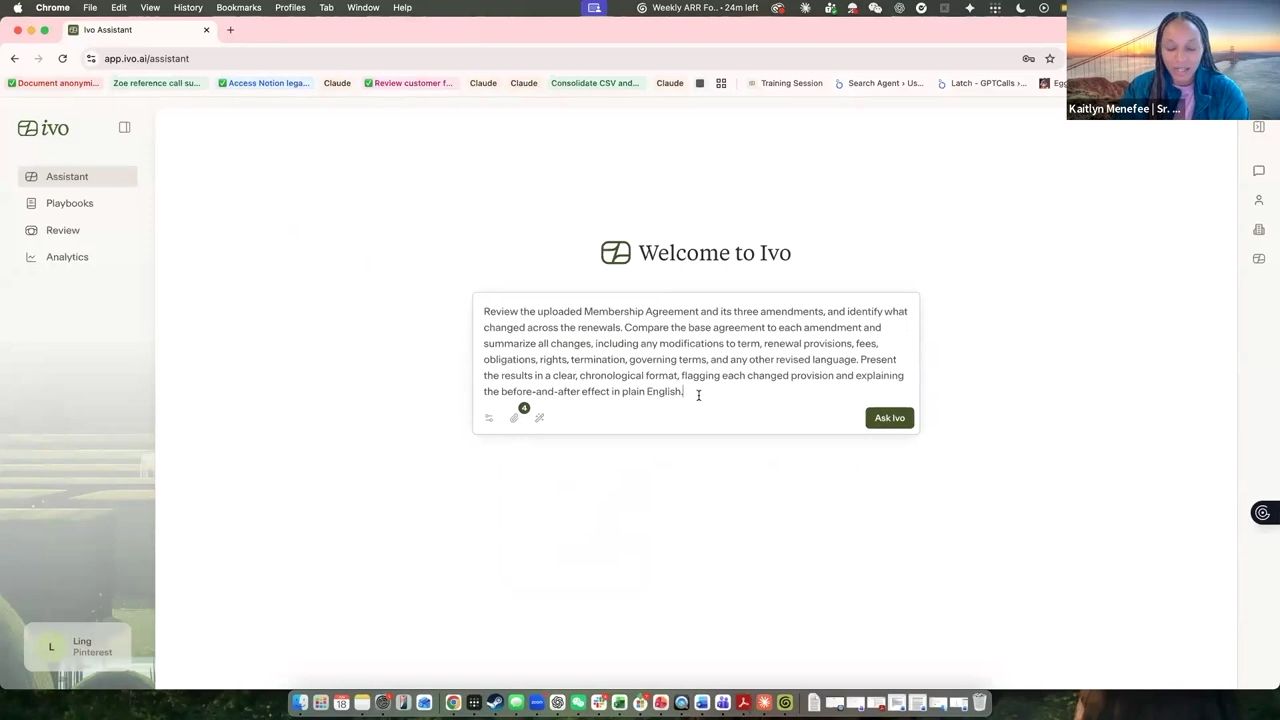
Ivo displays, across categories, what has actually changed in the agreement. Kaitlyn can say confidently what those changes are and whether the business needs to be concerned about them. And for follow-up questions, she can go to her history on the right side of the screen, open up the previous session, and ask additional questions in the conversation itself. No more hand-comparing text with highlighters and sticky notes like she used to do. She now has a downloadable summary and a table that can be checked and shared with her business partner in minutes.
Use Case 3: Deep Legal Research
A third Ivo use case that Kaitlyn uses Ivo for is a nuanced research question about different regulations cited in various agreements. Their team had been working with outside counsel on this particular deal, but this was an urgent request from the rest of the business.
It’s not always easy to convey urgency to outside counsel, and the cost can be considerable. In this instance, Kaitlyn thought Ivo’s research function might be a better fit. Her team saved money and time, and made their business partners very happy.
With Ivo’s Deep Legal Research toggled on, Kaitlyn uploaded her documents and prompted Ivo with:
"Act as an expert in New York real estate. Can you undertake some legal research to confirm that this letter waives the requirements to remove personal property from the premises for the lease, sublease, and sub-sublease, which are uploaded as underlying documents?"
“You can point [Ivo] to specific regulations, and it will tell you whether what you intend to say in the agreement is actually what you're saying, based on what it pulls from those regulations,” Kaitlyn notes.
Ivo did something she’d normally ask outside counsel to do; it checked against local regulations to confirm that the waiver is valid and enforceable. In this particular case, the draft is good as written, but Ivo flags certain things that made Kaitlyn want to take a closer look. It gives her the context she needs to decide whether they are ready to move forward with signatures or need to revise.
Don’t buy for the tool, buy for the impact
Ivo has had a big impact on Pinterest’s legal team, and Kaitlyn is very happy with how it’s removed a lot of the friction from her work.
She has advice for other lawyers on how to purchase the right AI legal tool for your organization: “I think you have to start from the bottom. Don’t ask, ‘what tool should we buy?" but 'do we actually know our positions? Do we have a playbook? Do we have positions we can articulate to an AI product to actually be helpful?’ Because if not, no matter what tool you select, it's not going to help you succeed. That internal alignment work is what comes first, and where you need to start.”
See more about how Pinterest uses Ivo.